

I’d check these 5 ACA reporting errors before filing - not just whether the forms are ready on time:
- Wrong employee names or Social Security numbers
- Incorrect offer-of-coverage codes
- Missed IRS filing or employee statement deadlines
- Missing employee or employer data
- Conflicting monthly entries on Form 1095-C
My starting point: compare Forms 1094-C and 1095-C with payroll and benefits records, then check IRS acceptance - not just transmission.
For 2026 reporting, employee statements are generally due March 2, 2027. IRS returns are due March 1 on paper, if permitted, or March 31 electronically. Filing 10 or more information returns generally requires electronic filing.
<u>Reporting penalties are separate from coverage penalties.</u> An error doesn’t automatically mean a penalty, but I’d correct it promptly and keep filing receipts, delivery records, and correction history to support any request for reasonable-cause relief.
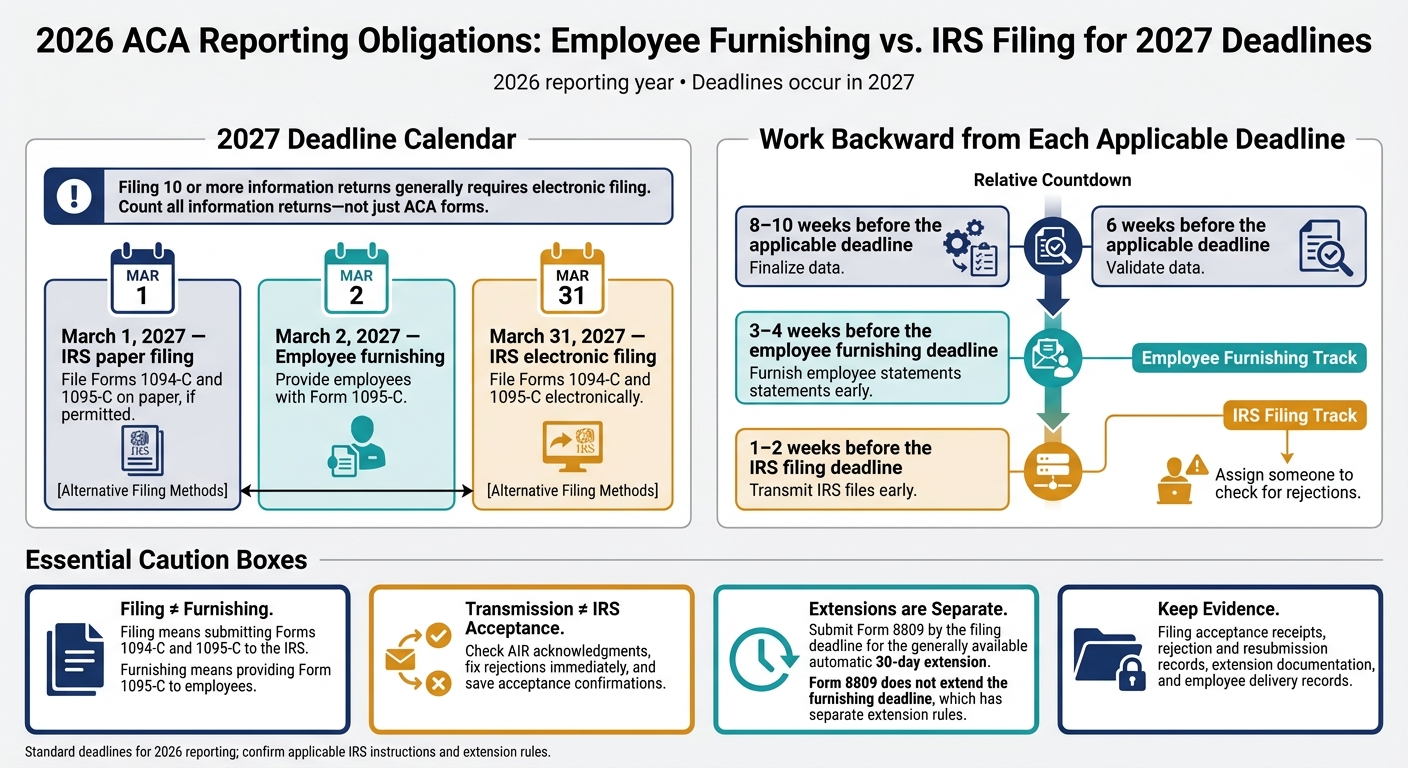
2026 ACA Reporting Deadlines and Filing Timeline
ACA Reporting 101
Compare group health plans for your Illinois business. Our local, licensed agents shop the top carriers and send you side by side quotes at no cost.
Get Group Quotes
ACA Reporting Errors at a Glance
These five errors cause the mismatches that most often trigger IRS penalties.
Review Forms 1094-C and 1095-C together. Compare Form 1094-C totals with Form 1095-C employee records. Correct employee records can still sit behind incorrect submission totals.
| Affected form | Reporting field | Common mistake | Preventive check |
|---|---|---|---|
| Form 1095-C | Employee name and SSN | Misspelled or outdated legal name, or transposed SSN digits | Check payroll and onboarding records before filing; report the full nine-digit SSN to the IRS. |
| Form 1095-C | Part II, line 14: offer-of-coverage code | Code does not match the offer type or coverage arrangement | Compare each month’s code with eligibility records, plan terms, and offer documentation. |
| Forms 1094-C and 1095-C | IRS filing and employee furnishing dates | Treating filing and furnishing as one deadline | Track separate deadlines, verify employee mailing addresses, and keep proof of both filing and furnishing. |
| Forms 1094-C and 1095-C | Required employer and employee data | Missing ALE member name, EIN, employee data, or authoritative transmittal indicator | Reconcile entity, payroll, benefits, and employee records before submission. |
| Form 1095-C | Monthly contribution amounts and coverage entries | Amounts or coverage entries conflict with the offer code, or a correction was not applied everywhere | Check monthly fields together against payroll and benefits records. |
Filing means submitting Forms 1094-C and 1095-C to the IRS. Furnishing means providing Form 1095-C to employees.
For 2026 reporting, the deadlines fall in 2027: March 2 for employee furnishing, March 1 for IRS paper filing, and March 31 for IRS electronic filing.
Before submitting, compare payroll records, benefits enrollment, and final ACA output. Keep proof of timely filing and furnishing, and correct errors promptly using IRS correction instructions. Use the checklist below for your last pre-filing review.
1. Incorrect Employee Names and Social Security Numbers
What goes wrong
A name change or mismatched records often causes this error. Marriage, divorce, or adoption can leave payroll, benefits, and SSA records out of sync. File the employee’s legal name and full SSN exactly as recorded with SSA - not a nickname or preferred name. The IRS copy must include all nine SSN digits; employee copies may generally hide all but the last four.
Why rejection or penalties may follow
A mismatch can cause the return to be rejected or accepted with errors. It can also lead to penalties, though reasonable-cause relief may apply.
What to check before filing
Check the names and SSNs on Form 1095-C against payroll, benefits, and SSA records, along with any documented name changes. For self-insured plans, check every covered individual in Part III, including dependents, against enrollment records.
Use a date of birth in place of a missing SSN only when IRS instructions allow it, and check that date against enrollment documents. Keep dated SSN requests and responses to support reasonable-cause relief.
How to fix the error
If the IRS flags a record, review the IRS acknowledgment and record-level error file right away. Fix and retransmit rejected submissions. For records accepted with errors, follow the applicable correction process. File the corrected record, provide a corrected employee statement when required, and keep proof of all filings and deliveries.
2. Incorrect Offer-of-Coverage Codes
What goes wrong
After name and SSN mismatches, another common reporting error is using a code that doesn’t match the coverage offer. The wrong code can make a valid offer appear missing or incorrect on the return.
Line 14 reports the offer, not the employee’s election. The code must match each month’s offer. Midmonth eligibility or month-end coverage changes can require 1H, “No offer of coverage.” An employee’s decision to decline coverage doesn’t remove the offer.
Why rejection or penalties may follow
Invalid code combinations can lead to IRS rejection or reporting penalties.
What to check before filing
Compare HR, payroll, and benefits records for eligibility, waiting periods, employment status, measurement and stability periods, termination dates, and coverage-end dates. Check each month separately. Use “All 12 Months” only when the same entry applies throughout the year.
Match each line to the monthly data using these records:
| Form field | What it reports | Records to check |
|---|---|---|
| Line 14 - Code Series 1 | Monthly coverage offer | Plan terms, eligibility files, offer and waiver records |
| Line 15 - Contribution | Lowest-cost self-only minimum-value offer | Employee rate sheets, contribution schedules, effective dates |
| Line 16 - Code Series 2 | Safe harbor, enrollment, employment status, or other relief | Payroll, hours, enrollment, waiting-period and termination records |
Line 15 uses the lowest-cost self-only minimum-value premium - not the cost of the employee’s elected coverage. Complete it only when the Line 14 code requires it.
If coverage ends with a midmonth termination, Line 14 generally uses 1H; Line 15 stays blank, and Line 16 code 2B may apply.
How to fix the error
Recalculate all three lines for every affected month. Document the original entry, the correction, and the supporting records.
Follow IRS correction procedures for Form 1095-C and any affected Form 1094-C reporting. Provide corrected employee statements when required. Add validation checks to flag 1H paired with a Line 15 amount and Line 16 codes that lack supporting records.
3. Missed IRS Filing and Employee Statement Deadlines
Accurate ACA forms can still trigger penalties if you miss a deadline.
What goes wrong
Employee furnishing and IRS filing have separate deadlines. Extending one does not extend the other.
For 2026 reporting, the standard deadlines are:
| Obligation | Standard deadline |
|---|---|
| Furnish employee Forms 1095-C | March 2, 2027 |
| File Forms 1094-C and 1095-C on paper, if permitted | March 1, 2027 |
| File Forms 1094-C and 1095-C electronically | March 31, 2027 |
Why rejection or penalties may follow
A transmission timestamp does not prove IRS acceptance. Check AIR acknowledgments, fix rejections immediately, and save acceptance confirmations.
What to check before filing
Count all information returns - not just ACA forms. Filing 10 or more generally requires electronic filing.
Build time into your schedule: finalize data 8-10 weeks before the applicable deadline, validate it six weeks before, furnish employee statements 3-4 weeks early, and transmit IRS files 1-2 weeks early. Assign someone to check for rejections.
If you need more time to file, submit Form 8809 by the filing deadline for the generally available automatic 30-day extension. Form 8809 does not extend the furnishing deadline, which has separate extension rules.
Mail or hand-deliver employee statements, or use IRS-approved electronic delivery methods. Follow the separate rules if you use an alternative furnishing process.
How to fix the error
First, determine whether you missed filing, furnishing, or both. Submit missing returns, resolve rejected transmissions, and furnish overdue statements promptly. Check whether extensions or reasonable-cause relief are available.
Keep an audit file with final forms, IRS acceptance receipts, rejection and resubmission records, extension documentation, mailing or delivery evidence, electronic-consent records, and website notices with dated requests and responses. Record when you found and corrected the error; delays can increase penalties.
If timing was not the issue, check whether the forms are complete and consistent.
4. Missing Employee and Employer Data
What goes wrong
Filing on time doesn’t prevent penalties if required data is missing. Gaps in employee or employer fields - such as legal names, SSNs, addresses, status codes, coverage months, and ALE Member details - can leave an ACA return incomplete.
An ALE Member generally must report complete information for each employee who was full-time for at least one month during the calendar year. That includes employees treated as full-time under the look-back measurement method. For every employee who meets the filing threshold, include the required monthly data for the full reporting period.
Why penalties may follow
The IRS may treat a return with missing required fields as incomplete and assess penalties.
What to check before filing
Reconcile records monthly - not just at year-end. Check the following against the benefits administration system and payroll register:
- Payroll status, hours or measurement results, eligibility dates, and waiting periods
- Enrollment records, coverage elections, premiums, employee contributions, and affordability inputs
- Termination dates and protected or unpaid leave records
Give extra attention to employees who changed status, transferred between ALE Members, started midyear, took leave, or terminated employment.
Use this table to review commonly missed fields before filing.
| Data to verify | Form fields | Validation sources |
|---|---|---|
| Full-time status by month | Form 1095-C Part II, including Line 14 offer codes and Line 16 safe-harbor or other codes | Payroll hours, measurement-period results, eligibility files |
| Employment months and status changes | Form 1095-C Parts I and II; applicable monthly entries | HRIS, hire and termination records, leave files |
| Required dependent information under a self-insured plan | Form 1095-C Part III | Enrollment file, dependent-eligibility records, carrier or TPA report |
| Coverage elections and coverage months | Form 1095-C Lines 14, 15, and 16, plus Part III when applicable | Benefits platform, enrollment confirmations, effective and termination dates |
| Affordability inputs | Form 1095-C Line 15 and applicable Line 16 codes | Lowest-cost self-only premium, payroll deductions, rate sheets, affordability calculation |
| Employer details | Form 1095-C Part I and Form 1094-C Parts I-III | Legal entity master file, EIN confirmation, corporate and ALE-member records |
Check this mapping against the applicable IRS instructions. Codes and electronic-filing rules can change.
How to fix the error
Verify missing data against source records, then update HR, payroll, benefits, and reporting systems. Prepare corrected forms and, when needed, a corrected or replacement Form 1094-C following the current IRS instructions. Keep the reconciliation file, correction reason, approval record, and evidence of furnishing or filing.
5. Form 1095-C Entry and Consistency Errors
What goes wrong
Checking each field isn’t enough. The entire Form 1095-C must be internally consistent and match payroll and benefits records.
Why rejection or penalties may follow
The IRS can reject incomplete or invalid forms. Acceptance doesn’t rule out penalties if a form contains materially incorrect data.
What to check before filing
Compare each Form 1095-C with payroll, benefits, and enrollment records. Check that all monthly entries agree and that Form 1094-C totals match the forms filed.
How to fix the error
Use the AIR correction process for accepted or partially accepted filings. If a transmission was rejected, resend the full rejected submission, not just the incorrect record.
Correct the employee statement separately when required. Keep the original forms and IRS receipts, and document the changed values, reason for the change, reviewer, filing and furnishing dates, and acceptance status. If a correction is rejected, correct the most recently accepted record.
Use the checklist below for a final consistency review before filing.
ACA Reporting Penalty Prevention Checklist
Use this final check to catch the five ACA reporting errors most likely to trigger IRS penalties.
- Validate identities and monthly codes. Flag missing identifiers, duplicate SSNs, and name mismatches. Check each month’s offer codes against eligibility, enrollment, waiting periods, and affordability data. Review monthly and again before filing.
- Set separate filing and furnishing reminders. Assign an owner, set completion dates a few business days early, and confirm the current year’s employee furnishing and IRS filing deadlines.
- Check completeness and consistency. Ask a second reviewer to verify employee status, addresses, premium amounts, safe-harbor codes, EIN, legal name, ALE member details, and employee counts. Reconcile transmission counts, review IRS acknowledgments and error reports, and investigate undelivered statements.
- Correct errors promptly and keep records. Fix any errors immediately. Store forms, delivery proof, reconciliations, reviewer sign-offs, IRS receipts, and correction history in one secure annual file.
These checks support reasonable-cause relief but don’t guarantee it.
FAQs
How much could ACA reporting errors cost my business?
For returns required in 2027, the penalty depends on when you correct the return:
- Within 30 days: $60 per return.
- After 30 days but before August 1: $130 per return.
- After August 1 or if never filed: $340 per return.
Penalties apply separately to IRS filings and employee statements. That means one mistake can trigger two penalties. These federal penalties aren’t tax-deductible, and the amounts increase annually.
Am I liable for errors made by my ACA reporting vendor?
Yes. You’re still responsible for accurate ACA filings, even if a vendor submits them for you. Any penalties are assessed against you as the employer.
Get written confirmation of what was filed, which employees were included, and who handles rejected files. Set internal deadlines well ahead of IRS due dates. Review transmission records, correction logs, and final acceptance confirmations.
How do I request reasonable-cause penalty relief?
If you receive an IRS notice about potential ACA penalties, record the deadlines right away and put one person in charge of the response. Check the notice against your filed Forms 1094-C and 1095-C, payroll data, transmission records, employee statements, and correction history.
Then decide whether to accept the IRS position, submit corrections, or request relief with a written explanation. If the issues are complex or could lead to an assessment, consult an ACA reporting specialist or tax professional.
Recent Comments